Connecting to App
In order to connect the cylinder to the Dimplex Control App, you will first require the Dimplex Hub.
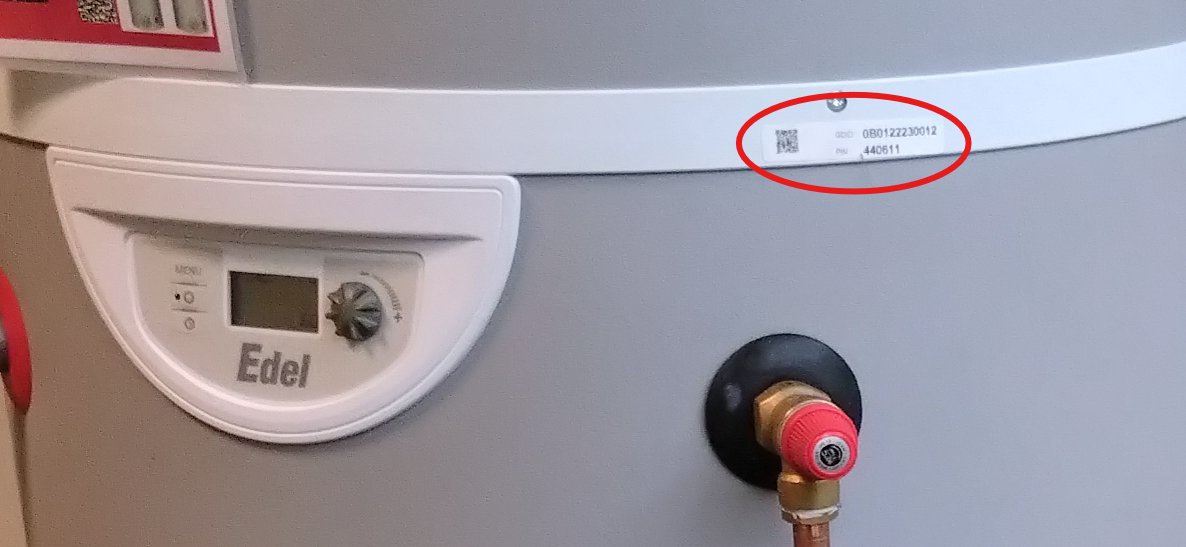
Once the Hub has been set up, you will be able to connect the cylinder, via the App by entering the GDID and PIN information. This information can be found as shown below:
Applicable Models:
Edel – EDL170-520RF, EDL200UK-630RF, EDL270UK-630RF, EDL200UK-630, EDL270UK-630
Require additional help? Please follow link below
https://glendimplexservice.freshdesk.com/a/solutions/articles/79000136321
Was this article helpful?
That’s Great!
Thank you for your feedback
Sorry! We couldn't be helpful
Thank you for your feedback
Feedback sent
We appreciate your effort and will try to fix the article